 2| Program Settings
  Address Options
2| Setup
2| Program Settings
Address Options
General
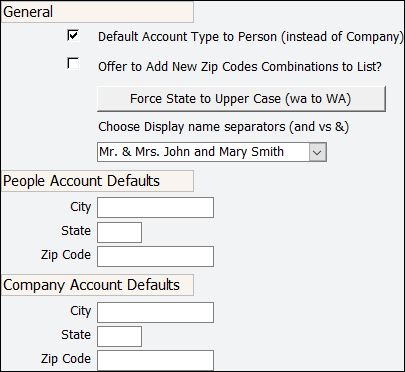
Default Account Type to Person: check this box to initially set the account type to 'Person' on screens where people are added like Enter People [3,1] ... if unchecked, the account type will initialize to 'Company'
Offer to Add new Zip Codes Combinations to List: AMPro can link a city and a state to zipcode. This way AMPro will automatically fill in the city and state when you select or enter the matching zipcode. If this option is clicked and you enter a new city, state, zip, AMPro will ask if you want to add this to the list.
Force State to Upper Case: click this button to force the 2-letter state code to upper case in all people records.
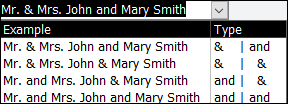
Choose Display Name Separators: select from the drop-down list your preferred way to address people on letters and other outputs. Since each organization has a preference as to how their constituent’s names should appear, this drop down box allows you to decide whether to use an ampersand (&) or the word “and” in your pre-built name fields.
People Account Defaults
City: a city name entered here will initially appear on the home address.
State: a 2-letter state code entered here will initially appear on the home address.
Zip Code: a 5-digit zip code entered here will initially appear on the home address.
NOTE: fill in the above with any values which you want to initially populate the
home addresses of Enter People screens
Company Account Defaults
City: a city name entered here will initially appear on the company (work) address.
State: a city name entered here will initially appear on the company (work) address.
Zip Code: a 5-digit zip code entered here will initially appear on the company (work) address.
NOTE: fill in the above with any values which you want to initially populate the
company (work) addresses of Enter People screens