3|
People  13| Zip Codes
Use Zip Codes [3,13] to setup a list of the postal codes in your database to assist you with entry of addresses for people and companies. The list can include both U.S. Zip Codes and Canadian Postal Codes.
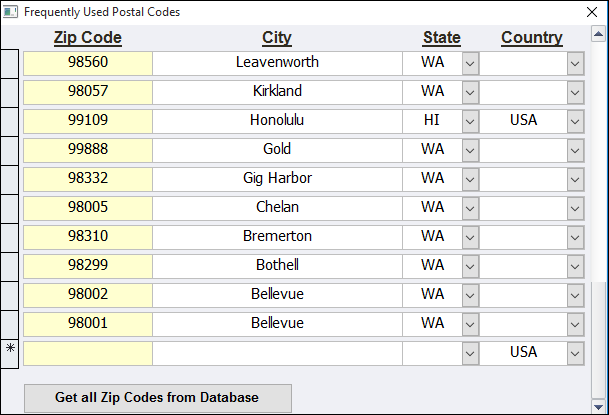 |
This multi-purpose Frequently Used Postal Codes screen serves as:
a viewer for your frequently used postal codes,
a selection tool to enter a zip code (plus city, state and country) for a person,
an editor for adding, changing, and deleting zip codes and
a master list for relating zip code to city, state, and country for everyone in the database
 |
Once you have a created a list of your most frequently used postal codes, you can save time in entering addresses by selecting the person's zip code from the drop-down zip code list on the Enter People screen, which then allows AMPro to fill in the city, state, and country for you. |
|---|
How to Manage Your Zip Code List
To add a zip code: click on the starred row (*) and type in the zip code.
To replace a zip code: click on the box containing the zip code, highlight the position, and type in the new zip code.
To change a zip code: click on the box containing the name just to the left of the number or numbers to be changed, press delete one or more times, then type in the correct numbers.
To delete a zip code: click on the row for that zip code, press the delete key, and click the 'Yes' button on the warning message (or click 'No' if you don't want it deleted).
To close the zip codes list: click on the 'X' in the upper right corner of the list window to return to the previous screen.

Click on this button to fill in the list of frequently used postal codes from the addresses contained for people in the database. This fills in the Zip Codes list with all the zip codes in your database along with the city, state, and country for each of those zip codes.