3| People
 1| Enter People and Register Attendees
  Home Information
The Home Information part of the Enter People and Register Attendees screen is where the names and contact information for the primary person and/or spouse are entered. You can enter one or two persons here. The second person does not need to be the primary person’s spouse, but he or she must share the same mailing address and the same bidder number on the night of the event. Please note that "spouse" is a gender-neutral term in this context.
 |
If the spouse has his or her own information (home address, work address, company or bidder number) then the primary and spouse must be entered separately by clicking the Add Person button again after completing the primary person's record. |
|---|
 |
Remember to click the Person (Home) button (if necessary). You can change the default for this field on the Addresses section of Program Settings [2,2]. |
|---|
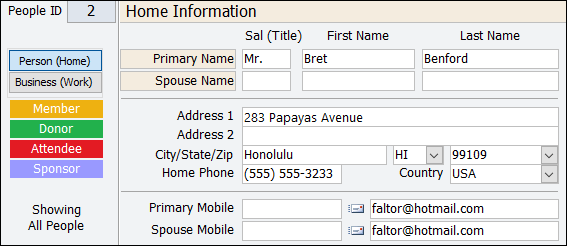
People ID: is a unique number that is assigned by the system when a record is first entered.
This is often referred to as a "tracking number" or an "ID".
NOTE: This number CAN NOT be changed and will never be duplicated.
Example: if People ID #83 is deleted, that number will never exist in this database again.
Person (Home): click this button to send mail to the home address.
Business (Work): click this button to send mail to the work address only.
FLAGS (Member, Donor, Attendee, Sponsor): are highlighted in colors to indicate if the account has each of those four designations. These are flags are set by AMPro when you enter information in the related tabs, so there is no need to click on them.
Address 1: enter the principal street address for both the primary person and spouse in this record.
Address 2: enter the secondary or extended street address (if necessary) for this record.
City/State/Zip: enter City, State and Zip Code. Or, you can choose a Zip Code from the Zip Code List [3,13] and let AMPro automatically fill in the City, State, Zip, and Country for you.
Country: select a country from the drop-down country list. If USA, you can either enter "USA" or leave it blank. If you used the Zip Code List, the Country (if there is one on the zip code list) will be filled in for you.
Home Phone: enter the phone number at home where the person and/or spouse can be contacted.
Primary Mobile: enter the mobile phone number for the Primary person.
Spouse Mobile: enter the mobile phone number for the Spouse.
Primary Email: enter the email address (if known) for the Primary person.
Spouse Email: enter the email address (if known) for the Spouse.
| |
You can send an email to either of those individuals by double-clicking on their email address field. |
|---|